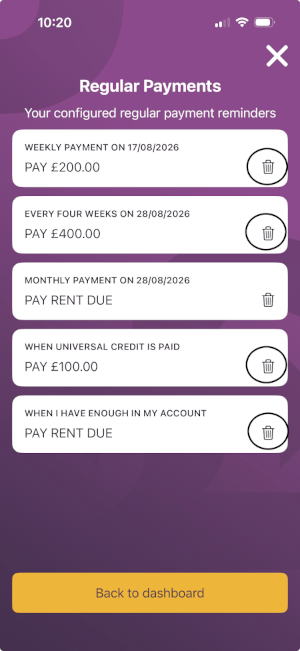

Rent Collector Regular Payments
26 Aug 2026
If you have EZPAY switched on, remember your Regular Payments will be made automatically, so make sure they are set up correctly, and you have deleted any old ones. If you still want to approve each payment, you can – just switch EZPAY off by tapping the EZPAY icon on your dashboard in Rent Collector.
To always pay the right amount, select “Pay Rent Due” when you set up a Regular Payment. If you select a set amount, this will be paid each time you have set your payment to trigger, even if you have already paid all your Rent Due for the month.
Managing your Regular Payments is easy, just open Rent Collector, tap on the ‘Regular Payments’ box to open up the Regular Payments screen and delete any unnecessary payments by tapping the bin icon next to the payments you don’t want to make.
.png)