


Getting the Best from Rent Collector - Notifications
2 Dec 2025

Since the launch of Rent Collector, we’ve kept things rather quiet, but now that more than half of our tenants have downloaded the App, it’s time to publish regular articles on how to make the most of it. Over the next few months, we’ll be updating you on everything from setting up reminders, using EZPAY, customising your App, and how to open a Digital Support Case if something goes wrong.
Set up your preferred payment notification dates
One of the great things about Rent Collector is that it puts you in complete control of your payments:
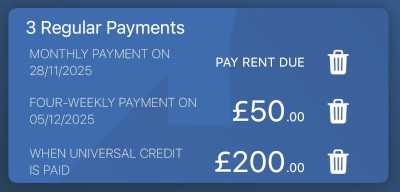
- Want to pay £50 every Friday when you get paid, £200 when your UC is paid to you, and any remaining rent due on the 28th of each month? Not a problem – set up a 4 weekly £50 notification for Fridays, a £200 notification that’s triggered by your UC payment hitting your bank account, and a monthly notification to pay ‘rent due’ on the 28th.
-
Changed jobs and need to change your payments from the 15th of the month to the 1st? Easy, just delete your old notification by tapping the bin icon next to the old notification and set up a new one.
These notifications feed through into our Rent Management System, so you don’t even need to notify us if your payment frequency changes – Rent Collector will let us know, and you’ll only be flagged up on the system if you miss a scheduled payment.
(Be aware that if you don’t have any notifications set up, the system will assume that you pay your rent in full on the 1st of the month and will flag your account for investigation if your account isn’t clear by the 3rd of the month).


